How to Detect Over-Packed Material Defects in Molded Inserts Using AI Vision Inspection
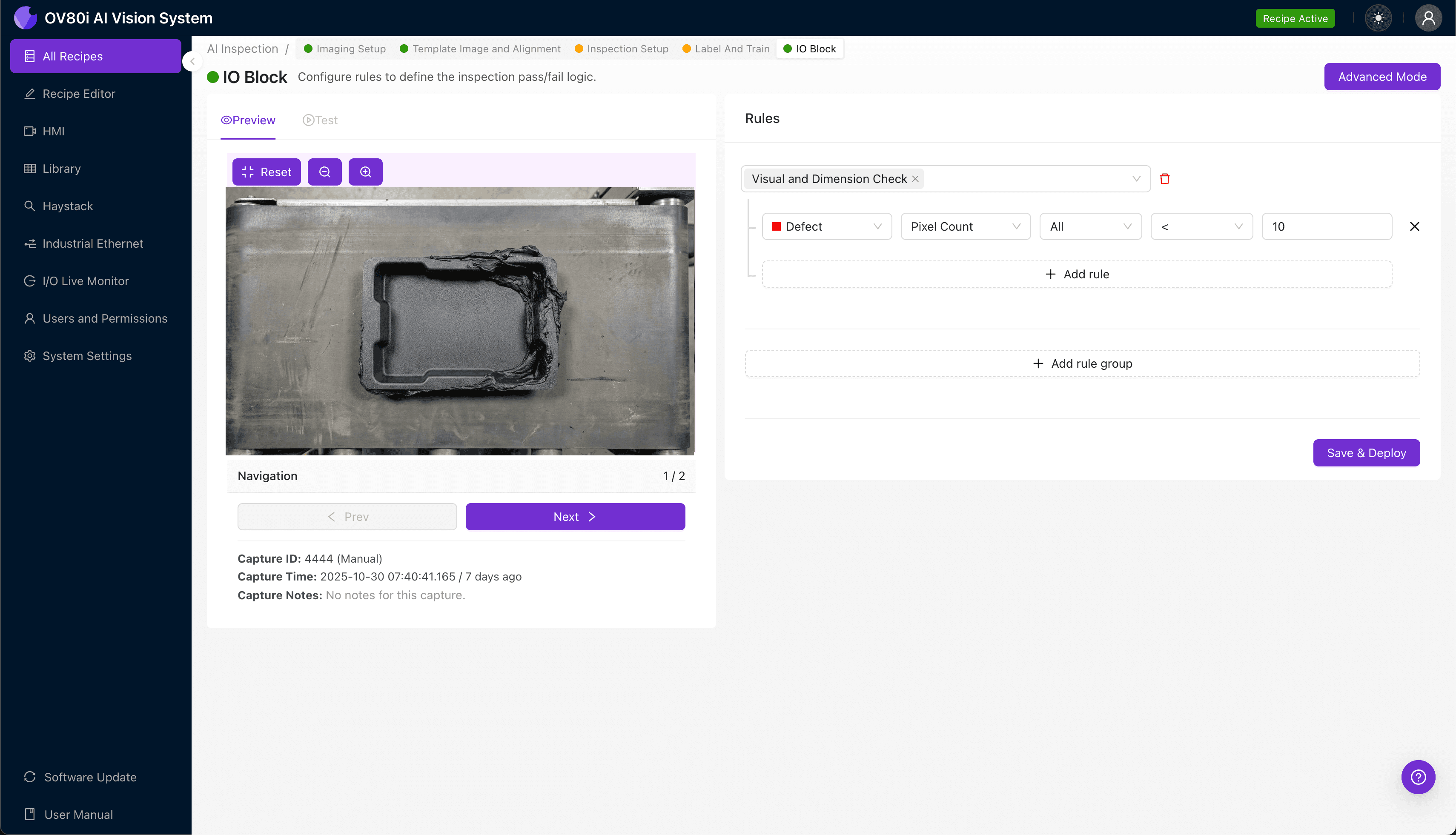
"Over-packed molded inserts cause flash, insert displacement, and thread occlusion that human inspectors struggle to catch consistently. AI-powered vision systems analyze every part with objective criteria at full line speed, eliminating inspection fatigue and enabling true 100% quality control."
The Problem: Why Over-Packed Molded Inserts Slip Through Manual QC
Molded inserts with over-packed material represent one of the most challenging defects to catch consistently in injection molding operations. When excess resin floods the cavity beyond design specifications, it compromises both the dimensional accuracy and functional performance of the finished component.
Common Defects in Over-Packed Molded Inserts:
- Flash formation – Thin, unwanted material extending beyond the parting line or insert boundaries
- Insert displacement – Metal or threaded inserts pushed out of position by excessive packing pressure
- Dimensional distortion – Parts exceeding tolerance due to material overfill in critical zones
- Surface blemishes – Sink marks, weld lines, or gloss variations caused by uneven packing
- Thread occlusion – Plastic material partially or fully blocking threaded insert features
- Ejector pin damage – Stress marks or cracks from difficult demolding of over-packed parts
Human inspectors struggle to maintain detection accuracy across full production shifts. Fatigue sets in quickly when examining hundreds of near-identical parts per hour, and subtle variations in flash thickness or insert position become nearly impossible to judge consistently at line speed.
The Solution: AI-Powered Visual Inspection for Molded Inserts
Machine vision systems equipped with deep learning overcome the limitations of human inspection by analyzing every part with the same objective criteria—shift after shift, without fatigue or distraction. Unlike rule-based vision systems that require explicit programming for each defect type, AI models learn to recognize the full spectrum of over-packing anomalies from labeled examples.
Overview.ai's approach delivers consistent, objective inspection at full line speed. The OV80i platform captures high-resolution images of each molded insert, processes them through trained neural networks, and makes pass/fail decisions in milliseconds—enabling true 100% inline quality control without bottlenecking production.
Step 1: Imaging Setup
Position your molded insert sample directly under the OV80i camera, ensuring the critical inspection surfaces face upward. Proper part placement at this stage establishes the baseline for all subsequent imaging.
Navigate to "Configure Imaging" in the Overview interface. Adjust Camera Settings including exposure time and gain until insert features appear crisp with clear contrast between the metal insert, molded plastic, and any over-packed material present.
Click "Save" to lock in your optimized imaging parameters.
Step 2: Image Alignment
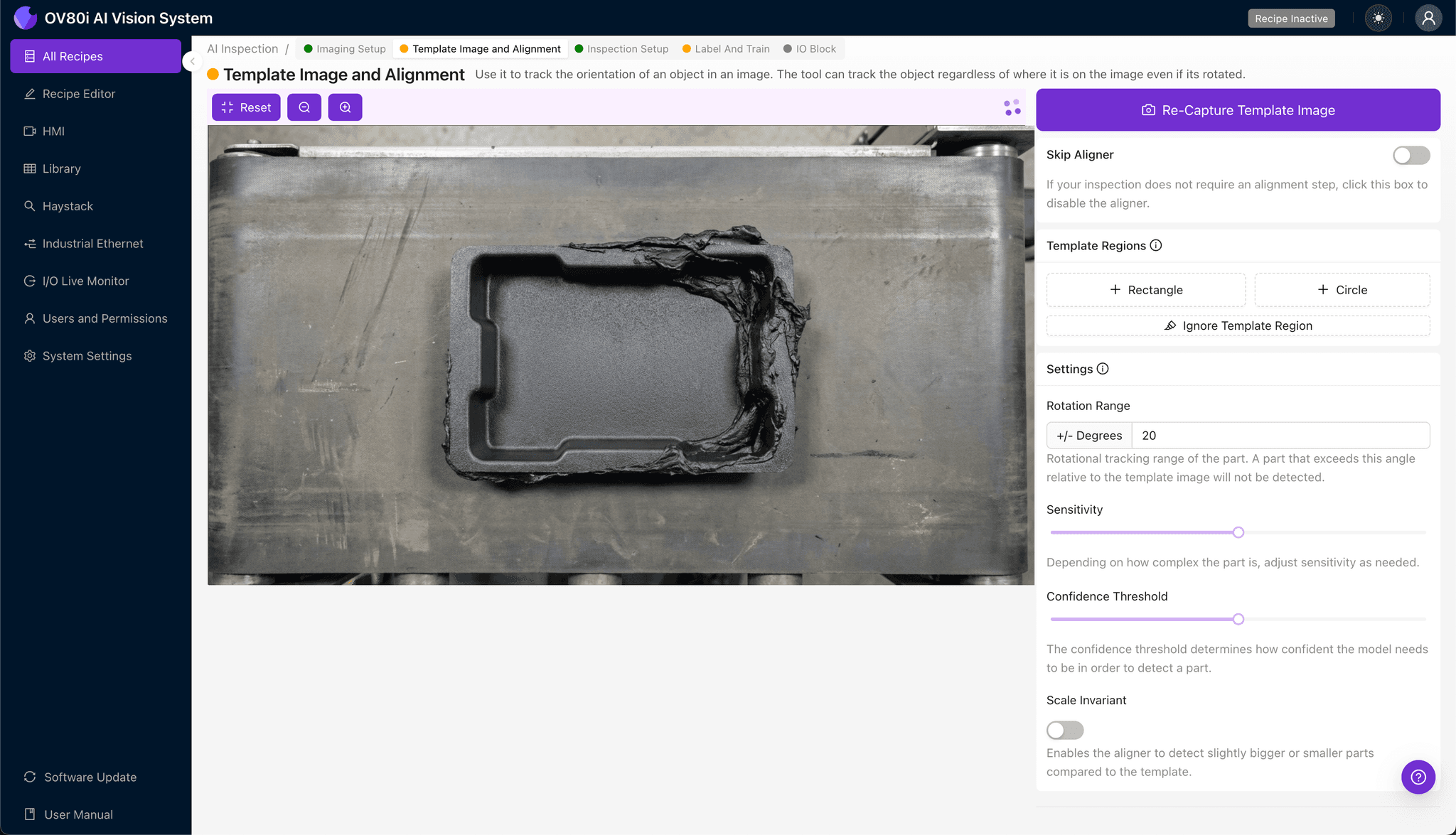
Navigate to the "Template Image" tab and capture a reference image of a known-good molded insert. This template establishes the baseline geometry the system uses to align all incoming parts.
Click "+ Rectangle" to add an alignment region around the main body of the insert. Set the "Rotation Range" to 20 degrees to accommodate normal variation in part orientation as components arrive at the inspection station.
Step 3: Inspection Region Selection
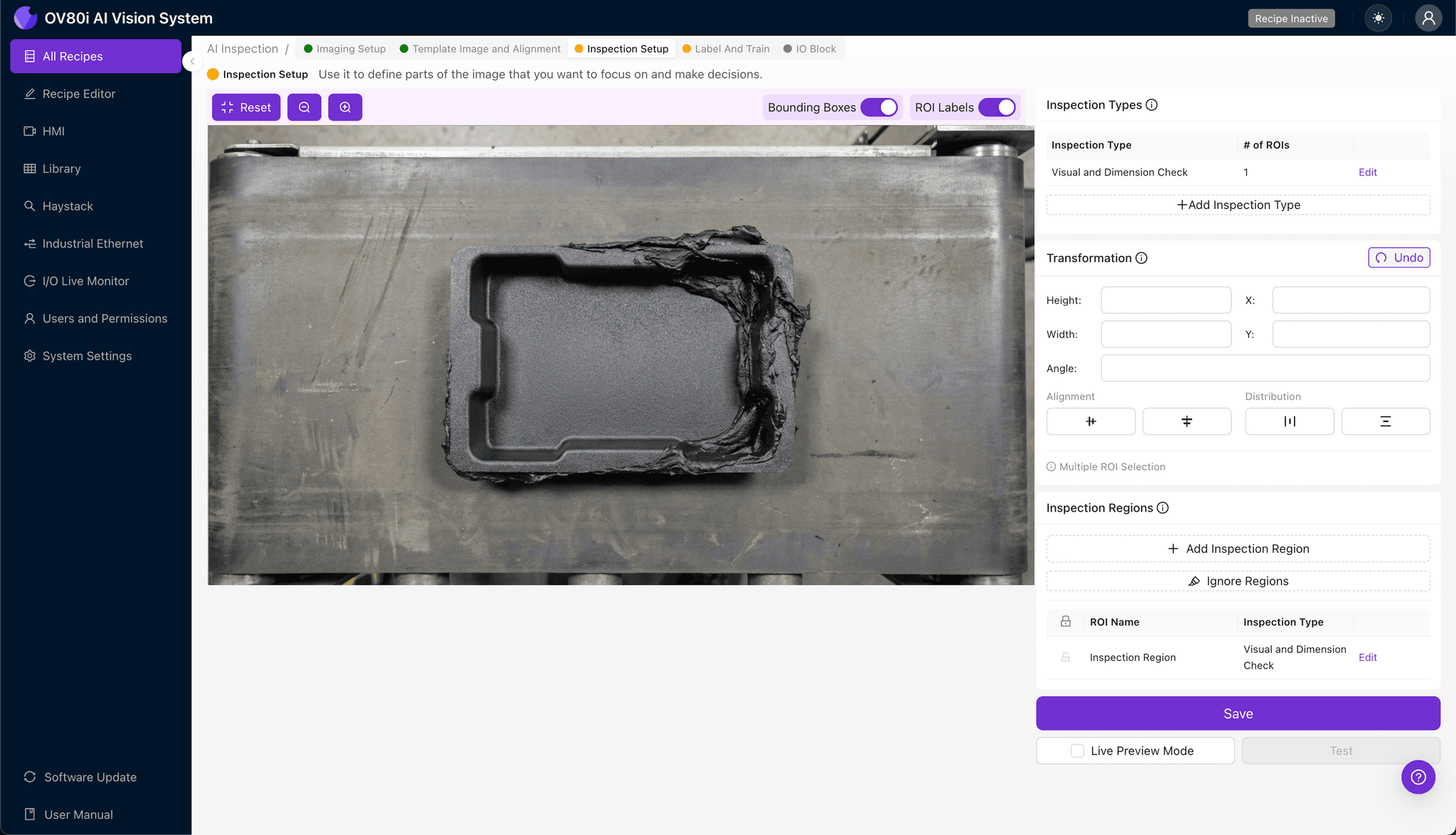
Navigate to "Inspection Setup" to define where the AI should focus its analysis. Rename your "Inspection Types" with descriptive labels such as "Flash Detection," "Insert Position," or "Thread Clarity."
Click "+ Add Inspection Region" for each critical zone. Resize the yellow bounding box to cover areas most susceptible to over-packing defects—typically the parting line perimeter, insert seating surfaces, and threaded features.
Click "Save" to confirm your inspection configuration.
Step 4: Labeling Data
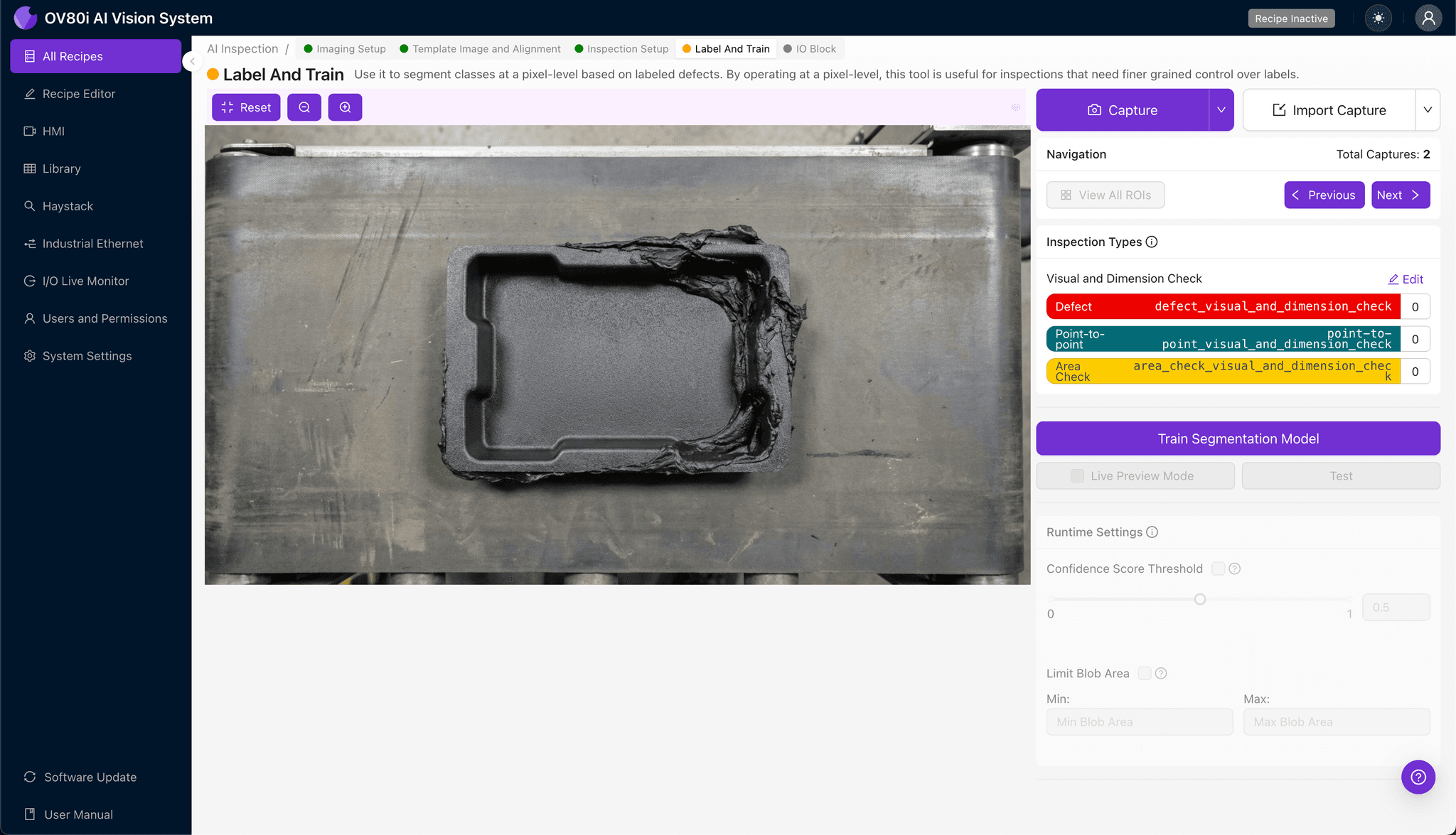
The human-in-the-loop labeling process teaches the AI what constitutes acceptable versus rejectable parts. Review captured production images and categorize each as Good or Bad based on your quality standards.
Include representative samples across normal production variation, as well as known failure modes like heavy flash, displaced inserts, and occluded threads. The more diverse your labeled dataset, the more robust your trained model becomes.
Step 5: Creating Rules
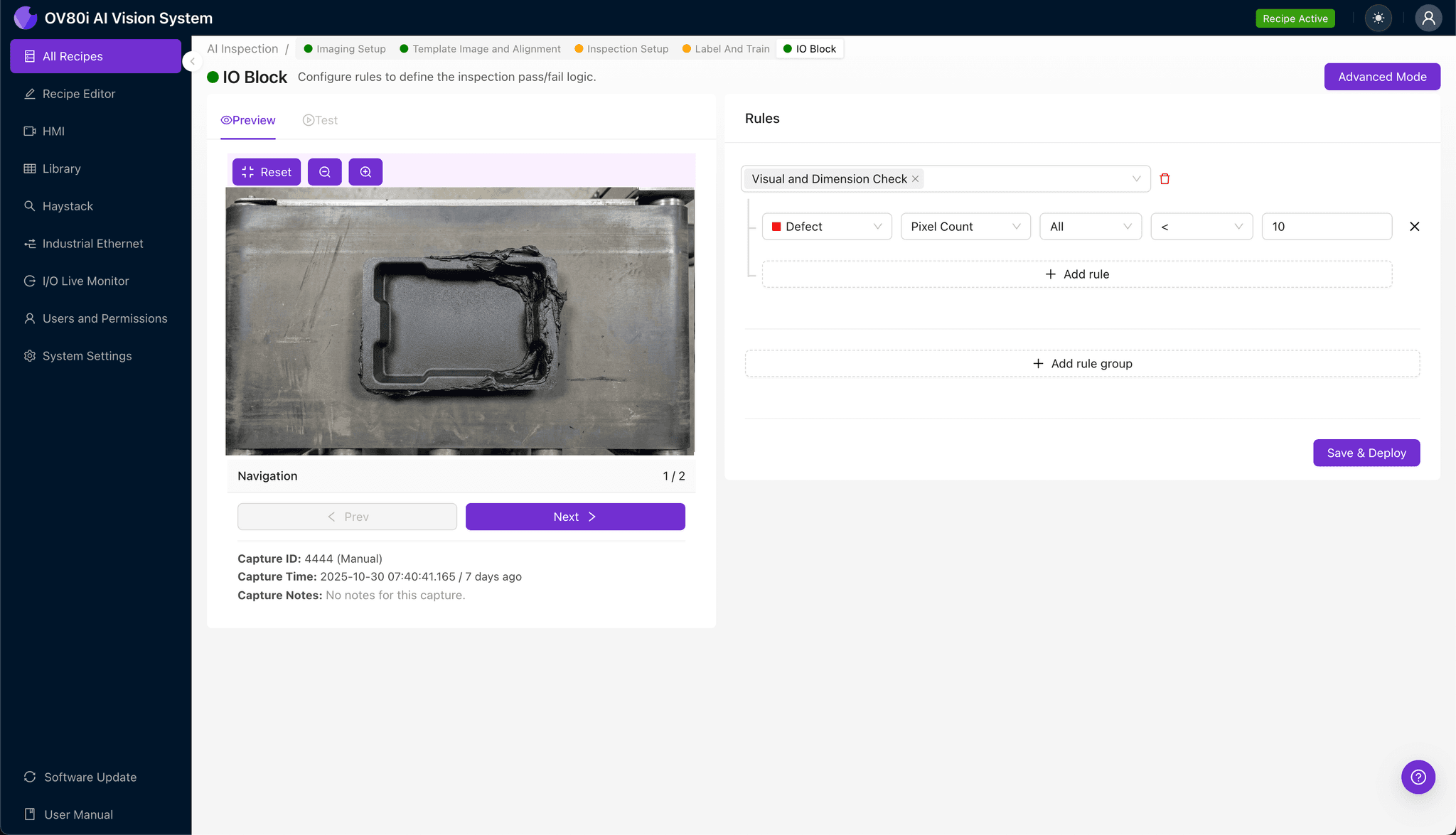
Configure your pass/fail logic based on the Inspection Types you defined earlier. Set threshold criteria that align with your quality specifications and customer requirements.
Gate automated acceptance on the line by integrating reject signals with your existing material handling equipment. Parts flagged as over-packed route automatically to quarantine bins for secondary review or scrap.
Key Outcomes & ROI
Implementing AI-powered inspection for over-packed molded inserts delivers measurable business impact:
- Reduced scrap rates – Catch over-packing defects before they progress downstream, minimizing wasted material and rework costs
- Higher throughput – Eliminate inspection bottlenecks with millisecond decision-making at full production speed
- Enhanced compliance and traceability – Automatically log inspection images and results for audit documentation and customer quality requirements
- Process improvement insights – Analyze defect trends over time to identify root causes and optimize molding parameters proactively
Ready to Eliminate Over-Packing Escapes?
Overview.ai's visual inspection platform transforms how manufacturers detect and prevent over-packed material defects in molded inserts. Contact our team to see how the OV80i can integrate with your existing production line.